 Documentation
Storage
The Kubernetes orchestrator offers several ways to utilize infrastructure storage. There are three important Kubernetes objects related to storage: StorageClass, PersistentVolume (PV), and PersistentVolumeClaim (PVC).
Storage Class
StorageClass provides a way for administrators to describe the classes of storage they offer. We differentiate between static and dynamic classes. A static class means that the storage representation in Kubernetes (PV+PVC) must be created in advance by an administrator or a controller to be used by a Pod. A dynamic class means that volumes can be created on demand as users request them, usually by creating a PVC.
Different classes might map to quality-of-service levels.
We offer the following storage classes:
-
nfs-csi— default dynamic class that uses NFS as connection protocol.-
While this class works as a database storage backend, users are encouraged to use the
zfs-csiclass for databases. -
Administrators can create a static PVC in advance, which is particularly useful when the volume will be accessed by a group of users over an extended period.
-
This storage class is backed by an all-flash storage array, providing high performance. However, performance may be constrained by the 10 Gbps link between the cluster and the storage system. Under heavy load, this can result in noticeable lag.
-
We can restore accidentally deleted files up to one week back, with day-level granularity. This means files created and deleted within the same day cannot be recovered.
The storage has no additional redundancy. In the event of a catastrophic failure of the storage array, all data will be permanently lost with no possibility of recovery.
-
-
nfs-csi-backup— Dynamic storage class using NFS as the connection protocol.- This class is functionally the same as
nfs-csi, but includes regular, system-level data backups to a separate physical location. - Data is retained for 30 days.
- Data recovery is available upon request; users cannot perform recovery autonomously.
- This class is functionally the same as
-
beegfs-csi— High-performance shared storage accessible from all nodes that support BeeGFS.- Tied to Quality of Service: All physical nodes contributing to the
beegfspool must be operational for any BeeGFS-based PVC to function. If a single node in this pool experiences hardware failure (CPU, memory, motherboard, etc.), all BeeGFS PVCs become non-functional, regardless of which node they were created on. - Currently, this includes all
kub-bnodes. However, BeeGFS is mounted and available across bothkub-bandkub-cnodes. - Ideal when ultra-fast shared storage is required — up to 10× faster than NFS.
- No backups or additional redundancy.
- Tolerates failure of one disk per node, but no additional redundancy is present.
- Accidentally deleted files cannot be recovered.
- Tied to Quality of Service: All physical nodes contributing to the
-
zfs-csi— High-performance local storage accessible only from the node where it is provisioned.- Tied to Quality of Service: The PVC is available only if the physical node hosting it is fully operational.
- Offers lower latency and better performance, especially when data access is mostly non-parallel.
- Ideal for databases or workloads involving large numbers of files, provided that parallel access across multiple nodes is not required.
- Strongly recommended to use database replicas to avoid a single point of failure.
- Tolerates failure of one disk per node, but a full node failure will render the PVC inaccessible.
- No backups or data recovery options are available.
-
s3-csi— Dynamic storage class that provisions a PVC representing your S3 bucket.- Useful when you need to interactively work with data stored in an S3 bucket, or if your application cannot natively use an S3 backend.
- Requires a two-step deployment process — detailed instructions are provided in a later subsection.
- Redundancy and data protection are determined by the underlying S3 storage provider.
-
sshfs— Storage class that uses the SSH protocol to connect to a remote node (not necessarily a storage node) and mount a file system.- Useful for mounting data stored on MetaCentrum storage.
- Requires coordination with system administrators — setup steps are described in a later subsection.
- Since the file system is emulated over an SSH connection, performance is limited.
-
Ephemeral storage — Fast local storage allocated from a node’s disk or memory.
- Tied to Quality of Service: If the Pod using this storage is moved to a different physical node, all data is lost.
- Useful for caching purposes — setup steps are described in a later subsection.
- If a larger amount of local storage is needed, users are encouraged to declare it as ephemeral storage and request the appropriate resources. This allows the scheduler to coordinate Pod placement with respect to node storage capacity.
- Unlike using the
/tmpdirectory, ephemeral storage can be shared among containers within the same Pod (e.g., sidecars). - Ephemeral storage cannot be shared between different Pods, even if they run on the same node.
- There is no additional data protection.
-
cvmfs— Specialized storage class for mounting software repositories, such as those from CERN or MetaCentrum.- Requires coordination with system administrators.
- Please send your request via email to: k8s@cerit-sc.cz
Persistent Volume (PV)
A PV represents a physical volume that provides storage connectivity. Only administrators can create PVs, and PVs are cluster-wide resources (not namespaced).
Persistent Volume Claim (PVC)
The PVC is an object that represents persistent storage in Kubernetes. This object can be mounted into a Pod. PVCs can be restricted to only one Pod or can be mounted to many Pods simultaneously, making it a shared storage among Pods.
- Users can create an ad-hoc PVC of the
nfs-csistorage class using the pvc.yaml template. Download it, fill in thenameandstoragesize, and issue the command:
kubectl create -f pvc.yaml -n [namespace]where namespace is the user namespace as seen in the Rancher GUI, usually surname-ns. The newly created PVC does not contain any data; the user needs to populate the data. The PVC name is exactly the same as the name value you fill in. Users can choose a different storage class according to the description above.
- Another option is to request administrators to create a special PVC according to your needs, for example, a PV that points to a specific folder on a storage server. You can request this at k8s@cerit-sc.cz.
You can view your PVCs in the Rancher GUI under Storage → PersistentVolumeClaims 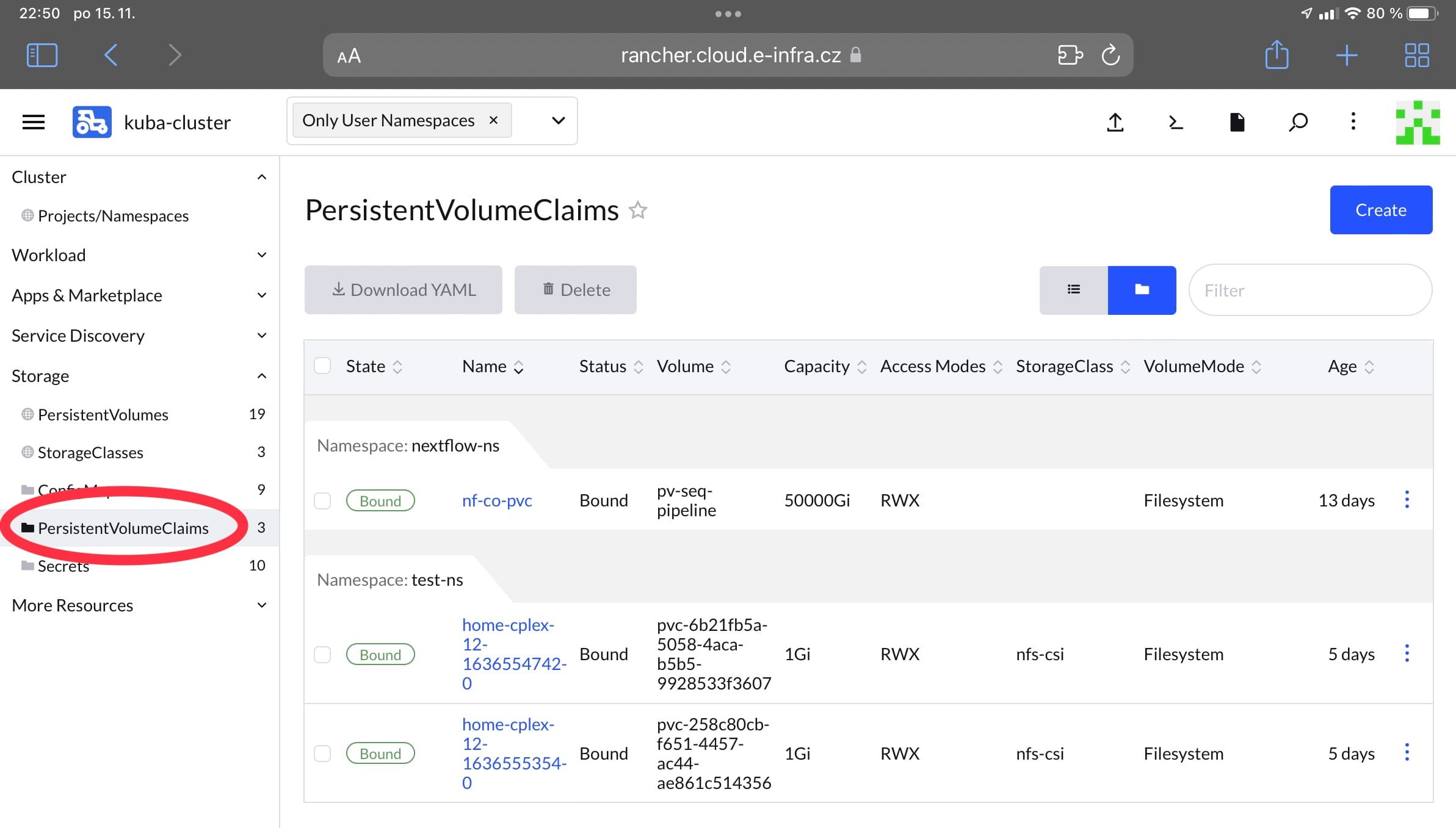 or use kubectl:
kubectl get pvc -n [namespace]Tutorials
This section provides tutorials on how to create a PVC of each storage class. Every YAML snippet can be saved into a file and then created with kubectl create -f [that yaml] -n [your namespace]. You can always check if a PVC has been created by issuing kubectl get pvc -n [your namespace] and looking for the PVC name. If a PVC remains in the Pending state for too long, there might be a problem. Normally, you should see the PVC in a Bound state within a few moments.
NFS
It is important to configure metadata.name, resources.requests.storage, and if necessary, spec.accessModes. Deploy to the appropriate namespace.
kind: PersistentVolumeClaim
apiVersion: v1
metadata:
  name: test-pvc
spec:
  accessModes:
    - ReadWriteMany
  resources:
    requests:
      storage: 2Gi
  storageClassName: nfs-csi
beegfs-csi
It is important to configure metadata.name, resources.requests.storage, and if necessary, spec.accessModes. Deploy to the appropriate namespace.
apiVersion: v1
kind: PersistentVolumeClaim
metadata:
  name: test-pvc-beegfs
spec:
  accessModes:
    - ReadWriteMany
  resources:
    requests:
      storage: 1000Gi
  storageClassName: "beegfs-csi"
zfs-csi
It is important to configure metadata.name, resources.requests.storage, and if necessary, spec.accessModes. Deploy to the appropriate namespace.
apiVersion: v1
kind: PersistentVolumeClaim
metadata:
  name: test-pvc-zfs
spec:
  accessModes:
    - ReadWriteMany
  resources:
    requests:
      storage: 20Gi
  storageClassName: "zfs-csi"
s3-csi
You need the S3 endpoint, bucket, access key, and secret key.
Current limitations
If you don’t have any S3 bucket, you can create one at https://s3-ui.cloud.e-infra.cz.
- Allowed bucket names are
[your-einfra-login]or[your-einfra-login]-*, e.g.viktorias-test - Endpoint name in the secret will be
https://s3.cloud.e-infra.cz
First, create a secret in a namespace with a name [secret-name]. The secret must have the following format:
apiVersion: v1
kind: Secret
metadata:
  name: [secret-name]
type: Opaque
stringData:
  accessKeyID: [your-access-key-id]
  secretAccessKey: [your-secret-key]
  endpoint: [endpoint]
  bucketName: [bucket]
Then create a PVC which must have the same name as the secret; therefore, in metadata.name, use the secret’s name.
apiVersion: v1
kind: PersistentVolumeClaim
metadata:
  name: [secret-name]
spec:
  accessModes:
  - ReadWriteMany
  resources:
    requests:
      storage: 5Gi
  storageClassName: s3-csi
sshfs
This demonstrates how to make your MetaCentrum home directory available as a PVC in Kubernetes.
First, create an SSH key pair:
ssh-keygen -b 4096 -t rsa -f ~/.ssh/custom_keyThis command generates a public key into ~/.ssh/custom_key.pub and a private key into ~/.ssh/custom_key. Create a .ssh directory using mkdir -p $HOME/.ssh and copy the full contents of the public key into your MetaCentrum home directory into the file .ssh/authorized_keys.
Second, create an SSH authentication secret in the namespace where you want to have MetaCentrum available as a PVC. The contents of the secret are the private part of the SSH key located in ~/.ssh/custom_key. The secret must have the following form:
apiVersion: v1
kind: Secret
metadata:
  name: secret-ssh-auth
type: kubernetes.io/ssh-auth
data:
  # the data is abbreviated in this example
  ssh-privatekey: |
    [full contents of private part of ssh key]
As a final step, administrators must create a PV (and PVC) for you. Email us at k8s@cerit-sc.cz and include information about your MetaCentrum username, which storage you want to mount, the namespace in Kubernetes where you want to have the PVC, and the secret name.
Ephemeral Storage
Ephemeral storage is allocated from a node’s local storage (disk or memory). Allocation is done through resource requests (see resources) and through volume mounts. If a Pod is evicted or moved to another node, the content of ephemeral storage is lost.
Ephemeral storage from local disk:
volumes:
- name: eph
  emptyDir:
    sizeLimit: 10Gi

volumeMounts:
- name: eph
  mountPath: /data
Ephemeral storage from local memory:
volumes:
- name: mem
  emptyDir:
    medium: Memory
    sizeLimit: 1Gi

volumeMounts:
- name: mem
  mountPath: /tmp
For local memory, see the requirements for memory resources.
Last updated on