 Documentation
Exposing HTTP Applications
This page covers exposing web-based (HTTP) applications on the cluster. Three methods are supported — Gateway API (HTTPRoute), Traefik IngressRoute, and nginx Ingress via the nginx-traefik emulation class. Each has different capabilities; pick the simplest one that covers your needs.
For non-HTTP protocols (SSH, databases, custom TCP), see Exposing Non-HTTP Applications.
Prerequisite
This guide assumes that your application (Deployment) is already deployed. If you are unsure, refer to the Hello World example.
Throughout this page, YAML fragments are provided. Deploy them using:
kubectl create -f file.yaml -n namespacewhere file.yaml contains the YAML definitions and namespace is the namespace where the application is running.
Choosing a method
| Method | Recommended for | TLS cert handled by | HTTPS backend | Notes |
|---|---|---|---|---|
Gateway API HTTPRoute (with shared traefik-gateway) | *.dyn.cloud.e-infra.cz names, new apps | shared gateway, zero config for single-label names; your own Gateway + cert-manager otherwise | via BackendTLSPolicy | Modern, stable API — Traefik middlewares attachable via extensionRef |
Traefik IngressRoute | anything else, TLS-passthrough, middlewares | cert-manager Certificate (must create explicitly) | yes (via ServersTransport) | Most flexible, uses Traefik’s native middleware CRD |
nginx Ingress (nginx-traefik) | existing nginx-flavored manifests you don’t want to port | automatic via cert-manager.io/cluster-issuer annotation (shim-driven) | yes (via backend-protocol: HTTPS annotation) | Emulation on top of Traefik |
TLS and certificates
TLS is terminated at the cluster boundary in all three cases. Traffic between the ingress/gateway and your Pod is plain HTTP unless you configure the backend to speak HTTPS (see HTTPS backend).
Always use the letsencrypt-gateway ClusterIssuer
Whenever cert-manager issues a certificate for you — for your own Gateway, an explicit Certificate used by an IngressRoute, or an Ingress annotation — use the letsencrypt-gateway ClusterIssuer. It is the only issuer whose ACME HTTP-01 solver is wired to the Traefik gateway.
With letsencrypt-prod or letsencrypt-stage, the certificate is never issued: their solver creates its own Ingress with ingressClassName: nginx (not nginx-traefik), which is routed via the wrong load-balancer IP, so the ACME challenge is never answered. This includes the legacy annotation pair kubernetes.io/tls-acme: "true" + cert-manager.io/cluster-issuer: letsencrypt-prod.
The common Service
All three methods expect a ClusterIP Service in front of your Pods:
apiVersion: v1
kind: Service
metadata:
  name: application-svc
spec:
  type: ClusterIP
  ports:
  - name: application-port
    port: 80
    targetPort: 8080
  selector:
    app: application
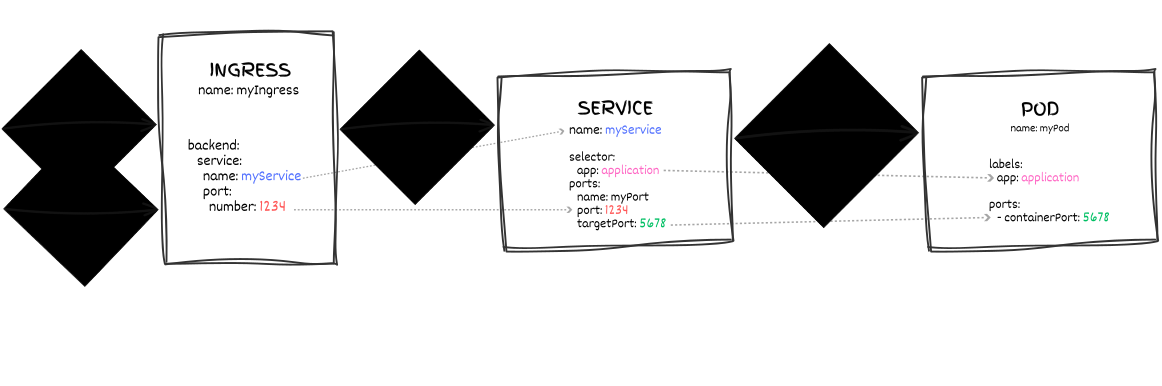
The overall architecture — external client → ingress layer → Service → Pods — is shared by all three methods and illustrated in the following figure. The figure uses an Ingress and generic names, but the route references the Service, and the Service selects the Pods, the same way with HTTPRoute and IngressRoute:
Gateway API (HTTPRoute)
The cluster has a shared traefik-gateway in the kube-system namespace that already owns the *.dyn.cloud.e-infra.cz wildcard TLS certificate and DNS. For hostnames under that suffix, you only create HTTPRoutes — no Gateway object, no Certificate; DNS and TLS happen automatically.
Notes
HTTPRoutehas noingressClassNamefield — the equivalent knob isspec.parentRefs: pointing attraefik-gatewayselects the controller, andsectionName: web|websecureselects the listener.- When you do need a certificate issued by cert-manager (custom FQDN, multi-level subdomain), use the
letsencrypt-gatewayClusterIssuer, either in theGateway’scert-manager.io/cluster-issuerannotation or in an explicitCertificate(see TLS and certificates).
something.dyn.cloud.e-infra.cz (single label, flat)
Two HTTPRoutes: one on the websecure listener (HTTPS, serves the app) and one on web (HTTP, redirects to HTTPS):
apiVersion: gateway.networking.k8s.io/v1
kind: HTTPRoute
metadata:
  name: application-websecure
spec:
  parentRefs:
    - name: traefik-gateway
      namespace: kube-system
      sectionName: websecure
  hostnames:
    - application.dyn.cloud.e-infra.cz
  rules:
    - backendRefs:
        - name: application-svc
          port: 80
---
apiVersion: gateway.networking.k8s.io/v1
kind: HTTPRoute
metadata:
  name: application-web-redirect
spec:
  parentRefs:
    - name: traefik-gateway
      namespace: kube-system
      sectionName: web
  hostnames:
    - application.dyn.cloud.e-infra.cz
  rules:
    - filters:
        - type: RequestRedirect
          requestRedirect:
            scheme: https
            statusCode: 301
The parentRefs point at the shared gateway (traefik-gateway in kube-system), not at a Gateway you create. sectionName: websecure and sectionName: web pick the HTTPS and HTTP listeners respectively.
The second route is needed because there is no automatic HTTP→HTTPS redirect: without it, plain-HTTP requests reach the web listener and get 404 / no server available. Always deploy both routes.
Deploy and test:
kubectl create -f httproute.yaml -n namespace
curl https://application.dyn.cloud.e-infra.cz/
DNS is registered automatically (the gateway publishes kuba-lb.cloud.e-infra.cz), and TLS is served from the shared gateway’s wildcard cert — no Certificate or Secret from you.
something.something.dyn.cloud.e-infra.cz (multi-level subdomain)
The shared gateway’s cert and DNS wildcard only match one label before dyn.cloud.e-infra.cz. Multi-level names like api.app.dyn.cloud.e-infra.cz need your own Gateway, plus an external-dns trigger and a cert-manager certificate:
# Trigger external-dns to create the DNS record, pointing to the LB.
apiVersion: v1
kind: Service
metadata:
  name: application-dns-anchor
  annotations:
    external-dns.alpha.kubernetes.io/hostname: api.application.dyn.cloud.e-infra.cz
    external-dns.alpha.kubernetes.io/target: kuba-lb.cloud.e-infra.cz
spec:
  type: ClusterIP
  clusterIP: None
  ports:
    - name: dns-anchor
      port: 80
      targetPort: 8080
  selector:
    app: nonexistent-dns-anchor-only
---
apiVersion: gateway.networking.k8s.io/v1
kind: Gateway
metadata:
  name: application-gateway
  annotations:
    cert-manager.io/cluster-issuer: letsencrypt-gateway
spec:
  gatewayClassName: traefik
  listeners:
    - name: web
      protocol: HTTP
      port: 8000
      hostname: api.application.dyn.cloud.e-infra.cz
    - name: websecure
      protocol: HTTPS
      port: 8443
      hostname: api.application.dyn.cloud.e-infra.cz
      tls:
        mode: Terminate
        certificateRefs:
          - kind: Secret
            name: application-tls
---
# redirect on :80
apiVersion: gateway.networking.k8s.io/v1
kind: HTTPRoute
metadata:
  name: application-web-redirect
spec:
  parentRefs:
    - name: application-gateway
      sectionName: web
  hostnames:
    - api.application.dyn.cloud.e-infra.cz
  rules:
    - filters:
        - type: RequestRedirect
          requestRedirect:
            scheme: https
            statusCode: 301
---
# real traffic on :443
apiVersion: gateway.networking.k8s.io/v1
kind: HTTPRoute
metadata:
  name: application-websecure
spec:
  parentRefs:
    - name: application-gateway
      sectionName: websecure
  hostnames:
    - api.application.dyn.cloud.e-infra.cz
  rules:
    - backendRefs:
        - name: application-svc
          port: 80
Note the differences vs. the flat case:
- Listener ports 8000 and 8443 are platform conventions, not yours to change. They are not the application’s port and have nothing to do with the HTTPRoute
backendRefs.port. The sharedtraefik-gatewayinkube-systembinds 8000 (HTTP) and 8443 (HTTPS) as system-level entrypoints; the LB outside forwards external:80 → :8000and:443 → :8443. Your application Service still exposes whatever port it likes (e.g. 80, 8080, 3000) on the cluster network, and the HTTPRoute’sbackendRefsport targets that. - The
hostnamefield on each listener is required in practice. The Gateway API CRD marks it optional, but on this cluster two things break without it: cert-manager’s gateway-shim won’t know which hostname to issue the cert for, and Traefik won’t program the listener for your host. Always sethostnameon both listeners and keep it identical acrossweb/websecure. - The
cert-manager.io/cluster-issuer: letsencrypt-gatewayannotation on theGatewaymakes cert-manager’s gateway-shim create theCertificatefor the listener hostname, stored in theapplication-tlsSecret — you don’t create theCertificateyourself. The shim creates it within seconds once DNS resolves. - The headless
application-dns-anchorService exists only to carry theexternal-dns.alpha.kubernetes.io/hostnameannotation. The selector intentionally matches no Pods.
As in the flat case, keep the web redirect route: your own Gateway has no automatic HTTP→HTTPS redirect either.
Timing pitfall: the first certificate request often fails because the new DNS record isn’t resolvable yet. See Debugging: certificate not issued for how to check DNS and retry.
Custom FQDN outside *.dyn.cloud.e-infra.cz
If you have a pre-existing DNS name (say app.example.org with a CNAME to kuba-pub.cerit-sc.cz or kuba-lb.cloud.e-infra.cz) — use the same pattern as the multi-level subdomain case, minus the dns-anchor Service (your DNS is already set up externally). Keep the Gateway with both listeners, both HTTPRoutes, and the cert-manager.io/cluster-issuer: letsencrypt-gateway annotation. cert-manager will issue a certificate once it can reach the ACME HTTP-01 endpoint via the LB.
Traefik IngressRoute
IngressRoute is Traefik’s own CRD and exposes everything Traefik can do — middleware support, forwardAuth, header rewrites, TCP+UDP variants via IngressRouteTCP/UDP. The middleware CRD itself isn’t IngressRoute-only though: Traefik middlewares can also be attached to Gateway API HTTPRoutes via an extensionRef filter, which is documented in the Authentication and IP allow-list / deny-list sections below.
Hard requirements for IngressRoute
- Issue the
Certificatefromletsencrypt-gateway, notletsencrypt-prod/letsencrypt-stage(see TLS and certificates). - Set the ingress class via the
kubernetes.io/ingress.class: traefikannotation — Traefik’s IngressRoute CRD has nospec.ingressClassNamefield, so the annotation is the only selector. Without it, Traefik does not see the route and no TLS cert is attached to the hostname. - Create the
Certificateobject explicitly. Unlike theGatewayandIngressmethods (where cert-manager’s gateway/ingress shim creates theCertificatefrom thecert-manager.io/cluster-issuerannotation), there is no shim forIngressRoute. If you forget theCertificate, the route goes live but Traefik serves its default self-signed cert and browsers warn.
Three pieces are needed:
- One
Certificate(issued byletsencrypt-gateway). - One “real”
IngressRouteon thewebsecureentrypoint referencing that TLS Secret. - One “redirect”
IngressRouteon thewebentrypoint, using aredirectSchemeMiddleware.
apiVersion: cert-manager.io/v1
kind: Certificate
metadata:
  name: application-tls
spec:
  secretName: application-tls
  issuerRef:
    name: letsencrypt-gateway
    kind: ClusterIssuer
  dnsNames:
    - application.dyn.cloud.e-infra.cz
---
apiVersion: traefik.io/v1alpha1
kind: Middleware
metadata:
  name: redirect-https
spec:
  redirectScheme:
    scheme: https
    permanent: true
---
apiVersion: traefik.io/v1alpha1
kind: IngressRoute
metadata:
  name: application-websecure
  annotations:
    # external-dns picks up the DNS name from the IngressRoute's Host rule.
    external-dns.alpha.kubernetes.io/target: kuba-lb.cloud.e-infra.cz
    kubernetes.io/ingress.class: traefik
spec:
  entryPoints:
    - websecure
  routes:
    - match: Host(`application.dyn.cloud.e-infra.cz`)
      kind: Rule
      services:
        - name: application-svc
          port: 80
  tls:
    secretName: application-tls
---
apiVersion: traefik.io/v1alpha1
kind: IngressRoute
metadata:
  name: application-web
  annotations:
    kubernetes.io/ingress.class: traefik
spec:
  entryPoints:
    - web
  routes:
    - match: Host(`application.dyn.cloud.e-infra.cz`)
      kind: Rule
      middlewares:
        - name: redirect-https
      services:
        - name: application-svc
          port: 80
The Middleware with redirectScheme is the IngressRoute-native equivalent of the RequestRedirect HTTPRoute filter. You must attach it via middlewares: under the route — Traefik doesn’t apply it from any global default.
nginx Ingress via nginx-traefik
The cluster runs Traefik with the nginx-traefik ingress class that emulates common nginx Ingress annotations, so you can bring most existing networking.k8s.io/v1 Ingress manifests unchanged. To move an Ingress from the legacy nginx class, see Migrating from NGINX Ingress.
Hard requirements for nginx-traefik Ingress
- Use
letsencrypt-gatewayas theClusterIssuervia thecert-manager.io/cluster-issuer: letsencrypt-gatewayannotation (see TLS and certificates). You do not need to create aCertificateobject yourself; cert-manager’s ingress-shim creates one from the annotation. - Set the class in BOTH places:
metadata.annotations.kubernetes.io/ingress.class: nginx-traefikandspec.ingressClassName: nginx-traefik. Different consumers read different fields — Traefik watches byingressClassName, cert-manager’s ingress-shim reads theingress.classannotation, and external-dns reads the annotation to know which DNS records to manage. Missing either one leaves a partially-working route (no DNS, no cert, or no Traefik pickup). - No automatic HTTP→HTTPS redirect. The Ingress serves your application over both HTTP and HTTPS; nothing redirects plain-HTTP requests by default. To redirect them, add the annotation
nginx.ingress.kubernetes.io/ssl-redirect: "true"(orforce-ssl-redirect), which Traefik’s nginx emulation supports.
apiVersion: networking.k8s.io/v1
kind: Ingress
metadata:
  name: application-ingress
  annotations:
    kubernetes.io/ingress.class: nginx-traefik
    cert-manager.io/cluster-issuer: letsencrypt-gateway
spec:
  ingressClassName: nginx-traefik
  tls:
    - hosts:
        - application.dyn.cloud.e-infra.cz
      secretName: application-tls   # created automatically by cert-manager ingress-shim
  rules:
    - host: application.dyn.cloud.e-infra.cz
      http:
        paths:
          - path: /
            pathType: Prefix
            backend:
              service:
                name: application-svc
                port:
                  number: 80
After applying, cert-manager creates a Certificate named after the TLS Secret (application-tls) in the same namespace and populates the Secret once the ACME challenge succeeds. You can watch progress with kubectl get certificate -n namespace.
Useful nginx-annotation equivalents under nginx-traefik
The following annotations were tested against Traefik 3.7.11 on this cluster:
| Annotation | Works? | Effect / caveat |
|---|---|---|
nginx.ingress.kubernetes.io/backend-protocol: "HTTPS" | ✅ | Backend speaks HTTPS; see HTTPS backend. |
nginx.ingress.kubernetes.io/whitelist-source-range: ... | ✅ | IP allow-list, matched against the real client IP. |
nginx.ingress.kubernetes.io/proxy-body-size: "2m" | ❌ silently ignored | No request-size limit is enforced; see Large uploads. |
nginx.ingress.kubernetes.io/custom-http-errors: '599' | no effect | Traefik doesn’t intercept upstream error bodies in the first place, so adding or omitting it behaves the same. |
nginx.ingress.kubernetes.io/auth-type: basic + .../auth-secret: <name> | ❌ silently ignored | No authentication is enforced; see the warning below. |
Not emulated — basic-auth annotations
The basic-auth annotations nginx.ingress.kubernetes.io/auth-type: basic + nginx.ingress.kubernetes.io/auth-secret: <name> are silently ignored by the nginx-traefik emulation — the route becomes ready without any authentication and never challenges clients. Use a Middleware with an IngressRoute or HTTPRoute for basic auth; see Authentication below.
Annotations not listed here have not been tested on this cluster. Check the Traefik nginx-ingress emulation notes for the supported subset — unsupported annotations are silently ignored, so verify the behavior after deploying.
Authentication
Basic authentication is implemented with a Traefik basicAuth Middleware. Gateway API HTTPRoute and Traefik IngressRoute differ only in how the middleware is attached; nginx Ingress has no working equivalent.
Gateway API HTTPRoute — via Traefik Middleware (extensionRef)
Gateway API has no native basic-auth / forward-auth. Traefik fills the gap via an ExtensionRef filter on the HTTPRoute that references a Traefik Middleware:
# htpasswd-style users Secret, one "user:hash" line per user
# (see "htpasswd generation" below)
apiVersion: v1
kind: Secret
metadata:
  name: application-basic-auth
stringData:
  users: |
    testuser:$apr1$vMbxgUQH$g0BROuQnToYSyzK0H.xvH0
---
apiVersion: traefik.io/v1alpha1
kind: Middleware
metadata:
  name: application-basic-auth
spec:
  basicAuth:
    secret: application-basic-auth
---
apiVersion: gateway.networking.k8s.io/v1
kind: HTTPRoute
metadata:
  name: application-websecure
spec:
  parentRefs:
    - name: traefik-gateway
      namespace: kube-system
      sectionName: websecure
  hostnames:
    - application.dyn.cloud.e-infra.cz
  rules:
    - filters:
        - type: ExtensionRef
          extensionRef:
            group: traefik.io
            kind: Middleware
            name: application-basic-auth
      backendRefs:
        - name: application-svc
          port: 80
Traefik IngressRoute — middlewares: on the route
Same Secret and Middleware as above, attached via the middlewares: list on the route:
spec:
  routes:
    - match: Host(`application.dyn.cloud.e-infra.cz`)
      kind: Rule
      middlewares:
        - name: application-basic-auth
      services:
        - name: application-svc
          port: 80
nginx Ingress via nginx-traefik
The auth-type / auth-secret annotations are not supported (see the warning above). Use one of the Middleware-based methods instead.
htpasswd generation
Traefik accepts htpasswd entries hashed with MD5 (apr1), SHA1, or bcrypt. Plain crypt (DES) hashes — produced by htpasswd -d, and by default in some older htpasswd versions — are not accepted. If you get 401 even with the correct password, regenerate the entry with one of:
htpasswd -nbB user pass                    # bcrypt
echo "user:$(openssl passwd -apr1 pass)"   # MD5 (apr1), if htpasswd isn't installed
Both print a complete user:hash line for the Secret’s users field.
IP allow-list / deny-list
Traefik’s ipAllowList middleware admits only the client addresses you list. Traefik has no deny-list middleware; the deny-list subsection below shows how to get the same effect.
Allow-list — only listed IPs
Allow only the client IP 147.251.254.207 on a Gateway API HTTPRoute via extensionRef:
apiVersion: traefik.io/v1alpha1
kind: Middleware
metadata:
  name: application-ip-allow
spec:
  ipAllowList:
    sourceRange:
      - 147.251.254.207/32          # your client
---
# on the HTTPRoute:
#   rules:
#     - filters:
#         - type: ExtensionRef
#           extensionRef:
#             group: traefik.io
#             kind: Middleware
#             name: application-ip-allow
#       backendRefs: [ ... ]
Requests from other addresses are rejected with 403 Forbidden.
For IngressRoute, attach the same Middleware via middlewares: on the route. For nginx-traefik Ingress, the equivalent is the nginx.ingress.kubernetes.io/whitelist-source-range annotation:
annotations:
nginx.ingress.kubernetes.io/whitelist-source-range: 147.251.254.207/32IPv6 matters — the cluster is dual-stack
The cluster is dual-stack: every Service, Pod, and the load balancer have both an IPv4 and an IPv6 address, and clients with IPv6 connectivity usually connect over IPv6. Filtering applies to both address families: if you allow only 147.251.254.207/32, the same person connecting over IPv6 arrives with an IPv6 source address and is denied. Always list the IPv6 addresses of the clients you want to allow as well, e.g.
sourceRange:
  - 147.251.254.207/32
  - 2001:718:801:42f1::207/128      # the same client's IPv6 address — adjust for your host
or use the IPv6 prefix of the network you intend to match.
Deny-list — everyone except listed IPs
Traefik has no built-in deny-list. ipAllowList admits only the ranges you list, and its ipStrategy.excludedIPs option does not block anything — it only tells Traefik which address in the X-Forwarded-For header to treat as the client IP.
To admit everyone except certain addresses, allow-list the complement: every range that remains after removing the blocked ones, for both IPv4 and IPv6. The following script prints such a Middleware. Set BLOCKED, then run python3 ip-deny.py > ip-deny.yaml:
#!/usr/bin/env python3
"""Print a Traefik ipAllowList Middleware that admits everyone except BLOCKED."""
import ipaddress

NAME = "application-ip-deny"
BLOCKED = ["147.251.254.207/32"]  # IPv4 and/or IPv6 networks to deny

allowed = []
for everything in ("0.0.0.0/0", "::/0"):
    ranges = [ipaddress.ip_network(everything)]
    for blocked in map(ipaddress.ip_network, BLOCKED):
        if blocked.version != ranges[0].version:
            continue
        ranges = [part
                  for net in ranges if not net.subnet_of(blocked)
                  for part in (net.address_exclude(blocked) if blocked.subnet_of(net) else [net])]
    allowed += sorted(ranges)

print(f"""apiVersion: traefik.io/v1alpha1
kind: Middleware
metadata:
  name: {NAME}
spec:
  ipAllowList:
    sourceRange:""")
for net in allowed:
    print(f"      - {net}")
For a single blocked IPv4 address, the result is 32 IPv4 ranges plus ::/0. Keep the IPv6 part: an allow-list that covers only IPv4 rejects every IPv6 client.
Attach the generated middleware the same way as the allow-list (via extensionRef on an HTTPRoute or middlewares: on an IngressRoute). For nginx-traefik Ingress, put the same ranges, comma-separated, into whitelist-source-range. Alternatively, check the client address in your application, which receives it from Traefik in the X-Forwarded-For and X-Real-Ip headers.
Client IP behind the LB
The CIDRs in sourceRange and whitelist-source-range are matched against the real client IP: the load balancer preserves the client’s source address up to Traefik, so you can list your users’ addresses directly. You don’t need to configure ipStrategy.
Timeouts and large uploads
Slow backends
By default, Traefik doesn’t limit how long your application may take to respond: its responseHeaderTimeout, which controls how long it waits for the backend, defaults to 0 (no limit). Slow APIs and long-running requests are not cut off by the gateway, so you don’t normally need to do anything.
If you want Traefik to give up on a slow backend, set a limit per service with a ServersTransport and reference it from an IngressRoute:
apiVersion: traefik.io/v1alpha1
kind: ServersTransport
metadata:
  name: application-timeouts
spec:
  forwardingTimeouts:
    responseHeaderTimeout: 300s   # max wait for the backend to start responding
---
# on the IngressRoute route:
#     services:
#       - name: application-svc
#         port: 80
#         serversTransport: application-timeouts
Long-poll / streaming responses
Keep-alives, idle timeouts, and buffering for long-lived connections (SSE, WebSockets, long-poll) are configured at the Traefik entrypoint, not per route. Traefik’s defaults work for most such applications; if you see disconnections, also check intermediate proxies (Cloudflare, a corporate VPN or proxy that inspects traffic) before asking for entrypoint tuning.
Large uploads
By default, no upload-size limit is enforced. The nginx proxy-body-size annotation is silently ignored (tested on Traefik 3.7.11: a 100 MiB upload passed through an Ingress limited to 2m), and IngressRoute and HTTPRoute have no size field of their own. The older nginx.org/client-max-body-size annotation belongs to a different controller’s (NGINX Inc.) schema and is not supported either.
To limit the request size on an IngressRoute or HTTPRoute, use Traefik’s buffering middleware:
apiVersion: traefik.io/v1alpha1
kind: Middleware
metadata:
  name: application-upload-limit
spec:
  buffering:
    maxRequestBodyBytes: 104857600   # 100 MiB; larger requests get 413 Request Entity Too Large
Attach it like any other middleware — via middlewares: on an IngressRoute route, or via an ExtensionRef filter on an HTTPRoute (see Authentication for both). With buffering enabled, Traefik reads the whole request before forwarding it (in memory up to 1 MiB, on disk beyond that), so your application gets an upload only once Traefik has received all of it. For nginx-traefik Ingress, there is no working annotation; use one of the other methods, or enforce the limit in your application.
Uploads are also limited in time. The shared gateway’s websecure entrypoint runs with
--entrypoints.websecure.transport.respondingtimeouts.readtimeout=3600so a client has at most one hour to send the complete request, including the body. An upload over a slow connection that takes longer is cut off. If that is not enough, open a platform ticket. Do not run your own Traefik instance in your namespace to work around it — that splits DNS/LB/routing state between two controllers.
HTTPS backend
By default the gateway/ingress speaks plain HTTP to your Pod. If your application serves HTTPS itself (e.g. it terminates its own TLS for compliance reasons), configure the route to re-encrypt upstream:
Traefik IngressRoute — ServersTransport
apiVersion: traefik.io/v1alpha1
kind: ServersTransport
metadata:
  name: skip-backend-tls-verify
spec:
  insecureSkipVerify: true   # accepts the backend's certificate without verification (e.g. self-signed)
---
# on the IngressRoute route:
#     services:
#       - name: application-svc
#         port: 443
#         scheme: https      # implied for port 443; required for any other port
#         serversTransport: skip-backend-tls-verify
nginx Ingress (nginx-traefik) — backend-protocol annotation
annotations:
  nginx.ingress.kubernetes.io/backend-protocol: "HTTPS"
Point the Ingress backend at the Service’s HTTPS port (backend.service.port.number: 443, or whatever port your Service exposes for HTTPS); Traefik then re-encrypts the hop between itself and your Pod.
Gateway API HTTPRoute
The Gateway API’s native mechanism is a BackendTLSPolicy resource targeting your Service. You provide the CA to trust (either via a ConfigMap or a Secret) and the hostname the gateway should expect in the backend’s TLS certificate:
# CA bundle used to validate the backend's TLS certificate.  For self-signed
# backends, this is just the same certificate the backend serves.
apiVersion: v1
kind: ConfigMap
metadata:
  name: backend-ca
data:
  ca.crt: |
    -----BEGIN CERTIFICATE-----
    ... PEM of the CA / self-signed cert ...
    -----END CERTIFICATE-----
---
apiVersion: gateway.networking.k8s.io/v1
kind: BackendTLSPolicy
metadata:
  name: backend-tls-policy
spec:
  targetRefs:
    - group: ""
      kind: Service
      name: application-svc
  validation:
    hostname: application-svc        # must match a SAN in the backend's certificate
    caCertificateRefs:
      - group: ""
        kind: ConfigMap
        name: backend-ca
---
# the HTTPRoute that uses it — backend port is the HTTPS one:
apiVersion: gateway.networking.k8s.io/v1
kind: HTTPRoute
metadata:
  name: application-websecure
spec:
  parentRefs:
    - name: traefik-gateway
      namespace: kube-system
      sectionName: websecure
  hostnames:
    - application.dyn.cloud.e-infra.cz
  rules:
    - backendRefs:
        - name: application-svc
          port: 443
spec.targetRefs[].kind must be Service (the only allowed target). spec.validation.caCertificateRefs[].kind may be ConfigMap or Secret — the referenced object must contain a PEM bundle under ca.crt (ConfigMap) or any PEM key (Secret).
Debugging: certificate not issued
Common causes
-
DNS isn’t resolvable yet. This typically happens right after you create a new hostname: the first ACME attempt runs before the record is visible to Let’s Encrypt, and the order fails with
urn:ietf:params:acme:error:dns: NXDOMAIN. Let’s Encrypt’s resolvers then cache the negative answer for the zone’s SOA negative TTL (typically 1 h). Check with:host application.dyn.cloud.e-infra.cz 8.8.8.8 host application.dyn.cloud.e-infra.cz 147.251.4.33 # the zone's authoritative name serverOnly once both return an
A/AAAArecord will ACME succeed. cert-manager retries a failed issuance on its own, but with a back-off that starts at one hour. To retry immediately, delete theCertificate; itsCertificateRequest,Order, andChallengeobjects are deleted with it:kubectl get certificate,certificaterequest,order,challenge -n namespace kubectl delete certificate application-tls -n namespaceFor
GatewayandIngress, the shim re-creates theCertificatewithin seconds and, once DNS is really up, the certificate is issued in about 30–60 s. ForIngressRoute, re-create yourCertificatemanifest yourself. -
Resource quota blocks the solver pod. cert-manager answers the HTTP-01 challenge with a short-lived solver pod in your namespace; if the namespace quota is exhausted, the pod can’t start. Look at events:
kubectl get events -n namespace | grep exceeded.quota. The solver needs100mCPU and100Mimemory. -
Wrong
ClusterIssuer— onlyletsencrypt-gatewayworks; see TLS and certificates. For anIngressor your ownGateway, set it in thecert-manager.io/cluster-issuerannotation; for anIngressRoute, in theissuerRefof yourCertificate. -
Challenge path redirected away from the solver. Let’s Encrypt requests
http://<hostname>/.well-known/acme-challenge/<token>on plain HTTP and follows redirects. If your redirect rule (or a global Traefik behavior) catches the challenge path before the solver does, the request ends up on HTTPS, where nothing answers it, and validation fails. Make sure/.well-known/acme-challenge/...reaches the solver over plain HTTP without a redirect.
Useful commands
kubectl get certificate -n namespace                          # Ready=True means issued
kubectl describe certificate <name> -n namespace              # status, events, failure reason
kubectl get certificaterequest,order,challenge -n namespace   # per-attempt ACME state
kubectl describe gateway <name> -n namespace                  # listener attachment & cert resolution
kubectl describe ingress <name> -n namespace                  # which controller has picked it up
Last updated on